RAXE Facets — Interactive benefits section for Shopify
$19.00
You install it in minutes from the Shopify admin. No apps, no third-party permissions, no external SaaS and no monthly fees.
ONE .LIQUID FILE | INSTALLATION GUIDE IN EN AND ES
Sections built to convert and to keep customers.
Comparativa con otras apps
La mismas situaciones, una al lado de la otra. Sin asteriscos escondidos abajo.
| Lo que te llevas | RecomendadoLo nuestro | Alternativa típica |
|---|---|---|
| Un solo pago | Sí | No |
| Funciona sin apps | Sí | No |
| Coste mensual | Ninguno | Desde 20/mes |
| Tiempo de instalaciónDe pegar a estar en vivo | 5 min | 1-2 días |
| Mandos en el personalizador | Sí | En parte |
| Scripts de terceros en tu tienda | No | Sí |
Comparativa basada en información pública.
You copy the file, paste it into your theme, and the section is ready to configure

Testimonios
10/10
 Marcos ValenciaCEO
Compre el footer y ya lo he colocado en 4 tiendas de clientes y la verdad es que funcionan de maravilla, se adaptan perfectamente al estilo de la tienda
 Diego RuizShopify E-commerce
Encontramos un FAQ interactivo con personalización propia de marca una vez dentro de mi tienda, pensé que no iba a funcionar y al contrario, nos ahorro mucho tiempo.
 Lucía FernándezE-commerce Manager
La verdad no pensé que fuera tan fácil de instalar, lo recomiendo
Ahorro de tiempo brutal en proyectos con tiempos ajustados
 Valeria RiosDiseñadora UX/UI
10/10
Marcos ValenciaCEO
La verdad no pensé que fuera tan fácil de instalar, lo recomiendo
Se nota que si verifican los archivos antes de publicarlos
 Rene Martinez
10/10
Marcos ValenciaCEO
La verdad no pensé que fuera tan fácil de instalar, lo recomiendo
Se nota que si verifican los archivos antes de publicarlos
Rene Martinez
Compre el footer y ya lo he colocado en 4 tiendas de clientes y la verdad es que funcionan de maravilla, se adaptan perfectamente al estilo de la tienda
Diego RuizShopify E-commerce
Ahorro de tiempo brutal en proyectos con tiempos ajustados
Valeria RiosDiseñadora UX/UI
Me pasaba que compraba secciones y al instalarlos algo fallaba, con la sección que adquirí aquí no me pasó eso... Sin duda volveré a comprar.
 GabrielDesarrrollador
Compre el footer y ya lo he colocado en 4 tiendas de clientes y la verdad es que funcionan de maravilla, se adaptan perfectamente al estilo de la tienda
Diego RuizShopify E-commerce
Ahorro de tiempo brutal en proyectos con tiempos ajustados
Valeria RiosDiseñadora UX/UI
Me pasaba que compraba secciones y al instalarlos algo fallaba, con la sección que adquirí aquí no me pasó eso... Sin duda volveré a comprar.
GabrielDesarrrollador
Encontramos un FAQ interactivo con personalización propia de marca una vez dentro de mi tienda, pensé que no iba a funcionar y al contrario, nos ahorro mucho tiempo.
Lucía FernándezE-commerce Manager
Los Schema están excelentes, no me genera errores, solo me salieron 2 advertencias pero nada de que preocuparse, eran por traer más configuraciones de las que permite Shopify pero no afecta en nada.
 Alejandro TorresFreelancer
Compre el componente de barra de urgencia y la integración fue muy sencilla, no se hizo mi web pesada y tampoco se desconfiguro
Encontramos un FAQ interactivo con personalización propia de marca una vez dentro de mi tienda, pensé que no iba a funcionar y al contrario, nos ahorro mucho tiempo.
Lucía FernándezE-commerce Manager
Los Schema están excelentes, no me genera errores, solo me salieron 2 advertencias pero nada de que preocuparse, eran por traer más configuraciones de las que permite Shopify pero no afecta en nada.
Alejandro TorresFreelancer
Compre el componente de barra de urgencia y la integración fue muy sencilla, no se hizo mi web pesada y tampoco se desconfiguro
No developers · no external apps
One single .liquid file. You paste it, switch it on and customize it from the Shopify admin.
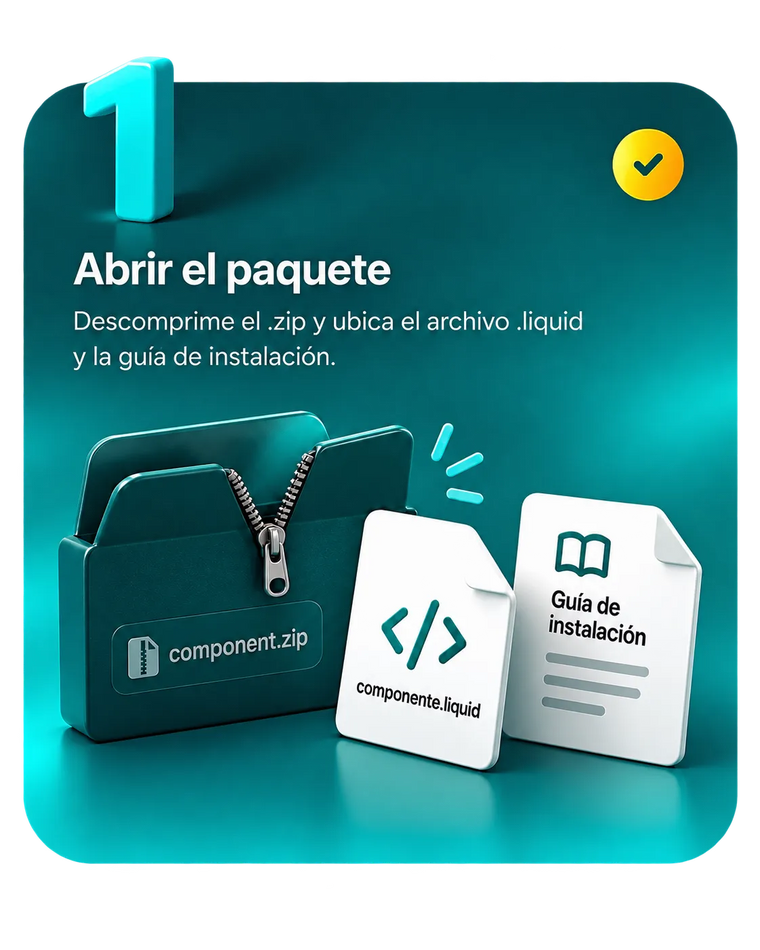
Step 1 of 5
Unzip the .zip you get by email. Inside are the .liquid file and the installation guide.
After your purchase, the link arrives by email
Step 2 of 5
In Shopify go to Online Store → Themes → ⋯ → Edit code and open the /sections folder.
Add a new section → name it as the guide says
Step 3 of 5
Open the new file, paste the contents of the .liquid inside and save. One single file, no dependencies.
Delete the sample template before pasting
Step 4 of 5
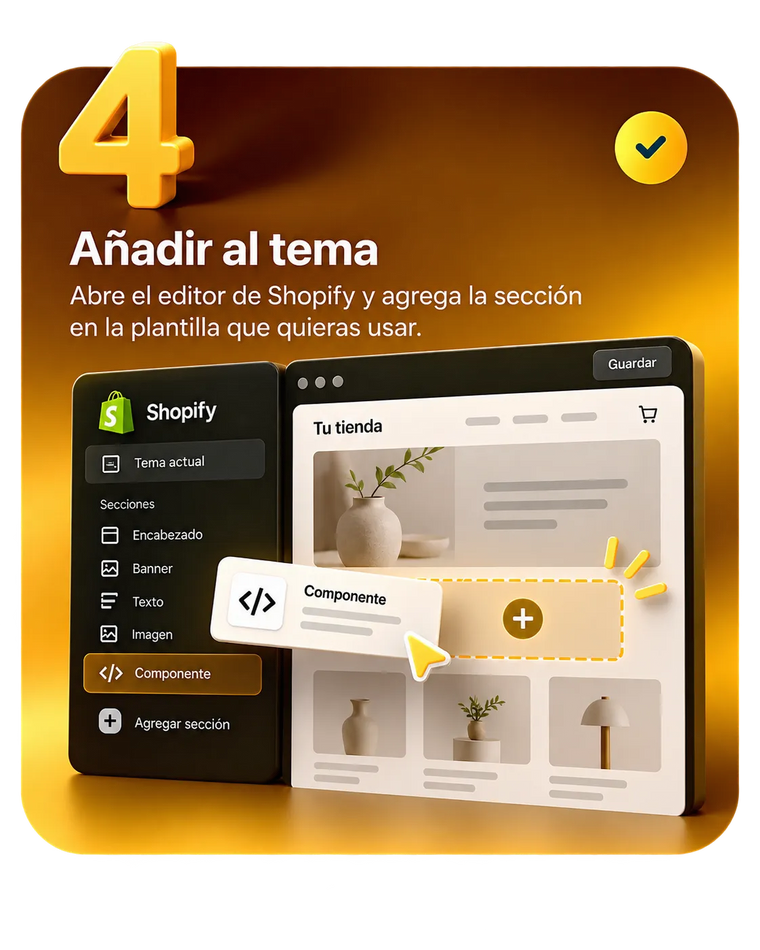
Go back to the customizer and use Add section on whichever template you want it.
You can drag it anywhere you like
Step 5 of 5
Set colors, text, sizes and effects from the panel. Save, publish, done.
Without touching a line of code
INSTALLATION HELP
Direct help installing your component
ES + EN Installation Guide, in every package.
See the change when you add a component
Vivid, exciting, and shaped to whatever your ecommerce store needs
EXPLOREOne single file, no apps: it installs in minutes.
Designed to walk the customer toward the purchase.
Editable from the Shopify admin so it fits your brand.
Its own sizes for desktop, tablet and phone.
RAXE VERIFIED
Premium Shopify component
One .liquid file. No apps.
We don't design Shopify components for looks alone. We build digital assets meant to raise trust, improve how your brand is perceived and turn more visitors into customers, through a structure grounded in UX, SEO and conversion optimization.
The component's .liquid file, ready to paste into your theme, and the step-by-step installation guide. Help installing it is included.
One single payment, no apps and no subscription. Future updates are not included in the base purchase.
You copy the .liquid file into your theme's sections folder, from Online Store → Themes → Edit code, and then add the section from the customizer. There's no theme to upload and no app to install.
The guide travels inside the package, and installation help is included with the purchase.
Yes.
Every section can be managed and customized from the Shopify admin with no coding knowledge.
You can update text, images, products and content whenever you need to.
They are built for Shopify OS 2.0, the standard behind current themes, and they are added as one more section without touching the rest of the theme.
If you're not sure about yours, write to us through Contact before buying.
They are not included in the base purchase: you acquire the file as it is offered on the day you buy it.
If you want them, specialized attention exists for exactly that: 3 months for 14 USD or 6 months for 24 USD. Each new version of the file arrives by email as soon as it is published.
No results. Try another search.
Still unsure? We'd be glad to help. Contact us →